Sunday, April 3, 2011

WM8505 LCD driver

Another low-level hack on my Android Apad ( clone/fake Apad? ).

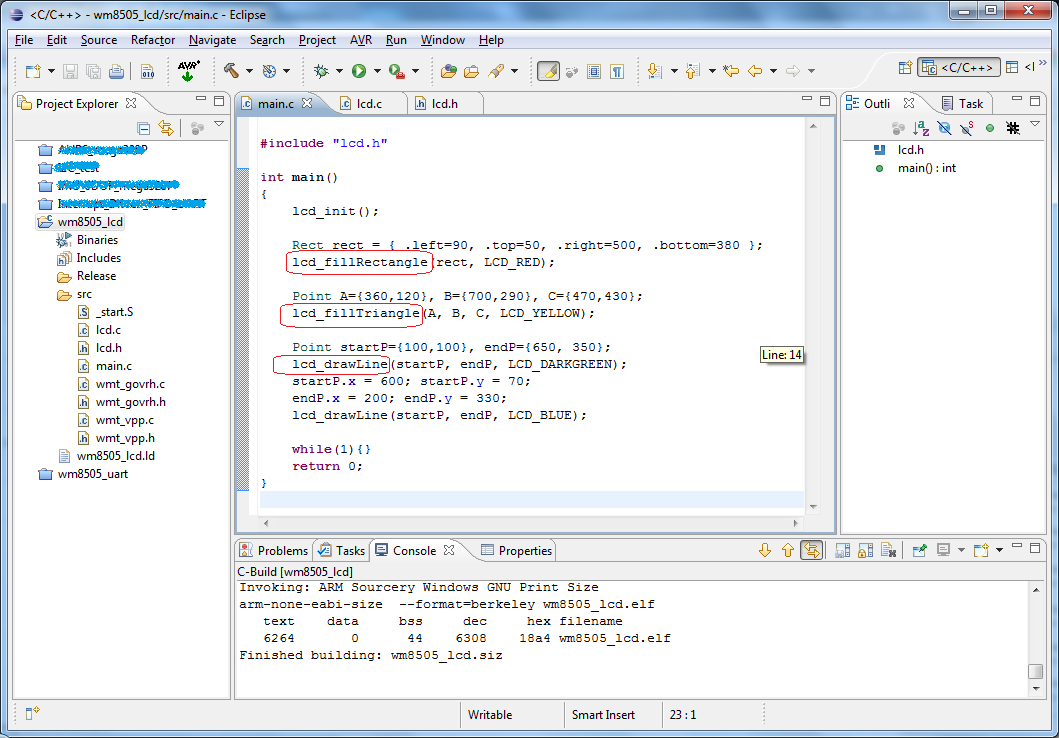
This time it's now with the 800x480 GLCD driver. It's working, but I'm not sure if the initialization is complete (i.e. the hardware is, most probably, already initialized by the bootloader). I've just modified the sources from Wondermedia (look at "\common\wmt_logo\" folder). LCD routines here are not using the graphics engine (GE) of WM8505.

download Eclipse project here:  ARM9_WM8505_LCD.zip

Read my previous post on how to set-up the tool-chain and how to load the program on WM8505.

    expected output:

forum link: Re: Let's learn ARM using cheap 7" tablets

Tuesday, March 29, 2011

Hello World, WM8505!

 My first step in learning the ARM9 platform.

VIA / WonderMedia's WM8505 (ARM926EJ-S):


UART0 Connection:

Serial console connection details:  Project Gus

Required Tools:  all are free =) 


The goal is to run this simple code: (main.c)

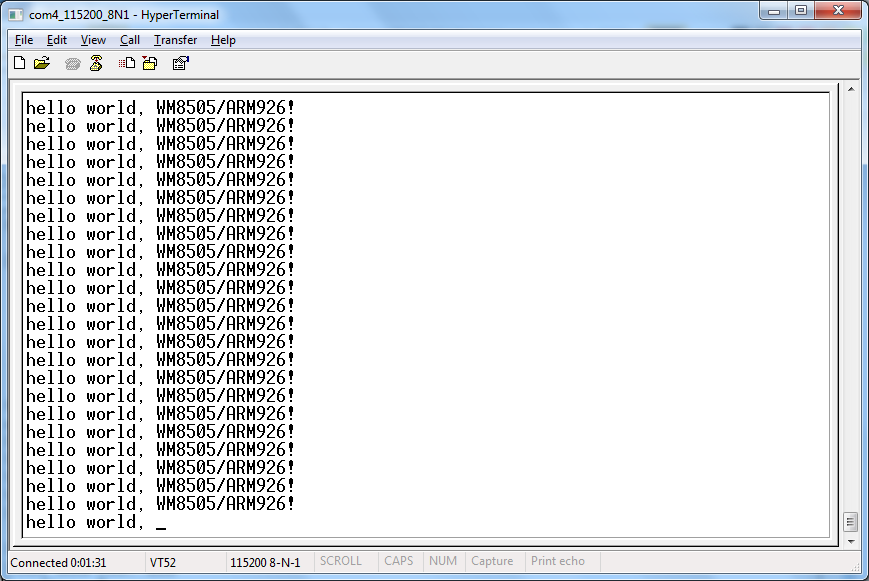
 It should output these strings on UART_0 port, just like this:


 After setting up the tools, here are the next steps:
-Create new project on Eclipse

 -Select target processor (WM8505 is a ARM926EJ-S processor)

-Select binary format for the flash image:

-linker setting:

 - after building the project, open the generated *.map file to verify the linker output
    *I don't know, yet, what's with this 0x03F80000 address.
      This is the load address used by Wondermedia version of U-BOOT

- Complete Eclipse project files:
download here: ARM9_WM8505_UART0.zip

* most of the hardware initializations (e.g. clock settings) are already done by the bootloader,
   so we don't have to worry about them for now.

Next question is, "how to load and run the code?
I've tested two ways of how to transfer the generated image to the RAM:
First is through tftp transfer, second is SD card load during boot-up.
Both method uses the bootloader, which is already present in the board (in the SPI flash).
My board got v1.1.4 of U-BOOT.

1. TFTP transfer to RAM.
- get a copy of this freeTFTPD32 server application.
- using the LAN adapter, connect board to host PC Ethernet
enter u-boot console, and type these commands:

* RAM load address can use other than 0x0

2. SD card scriptcmd
-guide:  How to edit "scriptcmd"
-during boot-up, the u-boot will read the "scriptcmd" script in the "script" folder of the SD card.

*these commands can also be typed in the uboot console. ("mmcinit" must be sent first)

references:
Wondermedia GPL sources
WM8505 datasheets
forum link:
Let's learn ARM using cheap 7" tablets
Thursday, February 3, 2011

MARG sensors + Bluetooth

MARG (Magnetic, Angular Rate, and Gravity) sensor array used for AHRS (Attitude and Heading Reference Systems).


Android OpenGL 3D display on Samsung Spica (i5700).


Sparkfun 9DOF sensor stick SEN-10389, later replaced by SEN-10321.

Using ATmega328P, operated at 3.3V supply and 8MHz crystal. At this speed, reading sensors' measurements and computing "AHRSupdate" take about 31ms to complete. Default compiler setting is used on WinAVR. With 25Hz sampling rate, this leaves mega328p extra 9ms to do other tasks. Bluetooth SPP (serial) communication is buffered and interrupt driven, so no processing time is wasted in reading and sending data to the android phone.


References:
(1) Sebastian Madgwick's Alternative AHRS (MARG) algorithm - Quaternion implementation of Mayhony's DCM filter incorporating magnetic distortion compensation.
(2) Fabio Varesano's FreeIMU. Also using Madgwick's implementation of the DCM filter on Arduino platform.
(3) Rotation convertions by Martin Baker. Very good discussion on quaternions and other 3D representation like Euler angles and transformation matrix.
(4) OpenGL Transformation Matrix by Song Ho Ahn
(5) Similar discusion on diydrones.com started by Harinath

Android project examples:
Android Bluetooth
Bluetooth Chat
Android OpenGL Projects
OpenGL ES tutorial
Android Bluetooth Oscilloscope

Special thanks to the generous guy who gave me these toys, Thank you very much!


Wednesday, January 19, 2011

Tuesday, December 14, 2010

N6610 LCD 3D Demo Part II

Instead of drawing only the edges of a polyhedron, this time we draw the faces and 'fill' it with corresponding colors. This demo now uses a dsPIC (16-bit and 40MIPS core) for "faster" and "smoother" graphics in the N6610/N6100 LCD (w/ pcf8833 controller). See "lcd6610.h" for the used pinouts.


There are several ways of "hidden surface removal". The easiest way, and most appropriate for drawing convex polyhedron is the use of Backface culling. "Backface" will determine whether a surface (e.g. triangular face) is need to be drawn or not.
/-----------------------------------------------------------------------------------/
Draw3D routine:


triangle color-fill routine:

(*another version of using dsPIC hardware multiplier/divider is included in the download)

detect whether a triangle is facing backward.


Complete MPLAB+C30 project (dsPIC33FJ16GS504):
n6610lcd_3D_demo_part2.zip


Wednesday, December 8, 2010

N6610 LCD 3D Demo

Nokia 6610/6100 LCD 3D projections demo using Microchip's PIC18F25J11. PIC18F25J11 is clocked at 12MHz external oscillator with 4xPLL enabled. It's operated at 3.3V supply, same with the LCD (and so, direct connections and higher spi clock rates are possible).

The demo is all about simple 3D projection - no rendering, no raycasting, etc., just the plotting of edges/lines. It displays common polyhedrons like tetrahedron, hexahedron(cube), octahedron, square pyramid, and triangular prism.

"3Ddemo.c"

*based on original sources:
Nokia 6100 LCD with CCS C
3D Vector objects in C using the PIC micro

Microchip C18 project:  n6610lcd_3D_demo.zip

Thursday, November 18, 2010

Nokia LCDs - Proteus VSM Models

Proteus VSM models for some Nokia LCDs


LCD controllers used:
PCF8833    - Nokia 6100/6610/6610i
S1D15G14 - Nokia 3530/3510i/3595
PCF8814    - Nokia 1100

Download: Nokia LCDs - Proteus VSM Models.zip
(MODELS + LIBRARY + some demos)
* just copy the files to their corresponding folder

//------------------------------------------------------------------------------------
//------------------------------------------------------------------------------------
//------------------------------------------------------------------------------------

//------------------------------------------------------------------------------------
UPDATES:
11-21-10
    - N6610LCD model (&symbol) was updated based on the datasheet of PCF8833 alone,
        but the result was different from expected. =(
        again, this model still have lots of problems!
    - found a bug on the N3530LCD model (PASET & CASET commands affected),
        corrected model will be uploaded soon.
    - I apologize for I cannot upload the source codes (msvc++ 2008) for these projects.
        ( Proteus ISIS itself is NOT free. VSM SDK, I assume, is also not open-source).
        ask for code snippets here: "Creating Proteus Models" ,instead.